Time is the one thing every business owner wishes they had more of. And while AI has been a buzzword for years, something has genuinely shifted in 2025 — AI agents are no longer a future promise. They’re working inside Microsoft Business Central right now, handling real tasks, making real decisions, and giving real hours back to real teams.
This isn’t about robots replacing people. It’s about giving your team a tireless digital assistant that handles the repetitive, rules-based work — so your people can focus on the work that actually needs a human.
So What Exactly Is an AI Agent?
An AI agent is different from a chatbot or a simple automation rule. It can:
- Understand a goal expressed in plain English
- Reason over your live business data to figure out the best steps
- Take action — updating records, releasing orders, sending notifications
- Pause and ask for human approval on anything that needs it
- Log every action for a full, transparent audit trail

What’s New in Business Central 2025 Wave 2 (BC27.4)
Microsoft’s latest update — Business Central 2025 Wave 2, released February 2026 — brings custom AI agent design directly into BC. This is a significant milestone: you can now build your own agents inside BC without any external tooling or developer code.
Here’s what the new Agent Designer lets you do:
- Create agents from scratch or use pre-built templates (like the Sales Validation Agent)
- Define the agent’s instructions in plain English — what it should do, and how
- Set permissions so the agent only accesses the data it needs
- Assign a profile that controls exactly which BC pages and actions the agent can see
- Test and refine the agent in the built-in Agent Task Playground before going live
- Activate the agent with a toggle — it then runs directly from your BC role centre
Out of the box, BC 2025 Wave 2 also includes two ready-to-use agents: the Sales Order Agent and the Payables Agent — both available immediately for any Business Central customer.
Learn more: yzhums.com/70502 — BC MVP Yun Zhu’s detailed walkthrough of the new Agent Designer in BC27.4.
How a Business Central AI Agent Actually Works
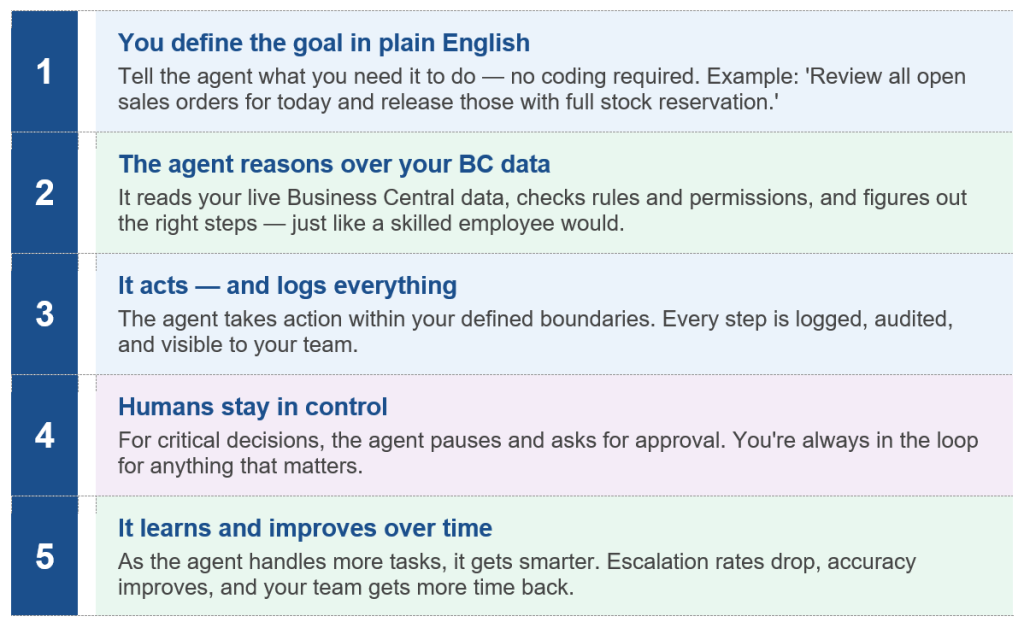
Here’s the five-step flow of how an AI agent handles a task inside Business Central:
Before vs. After: Real Tasks, Real Time Savings
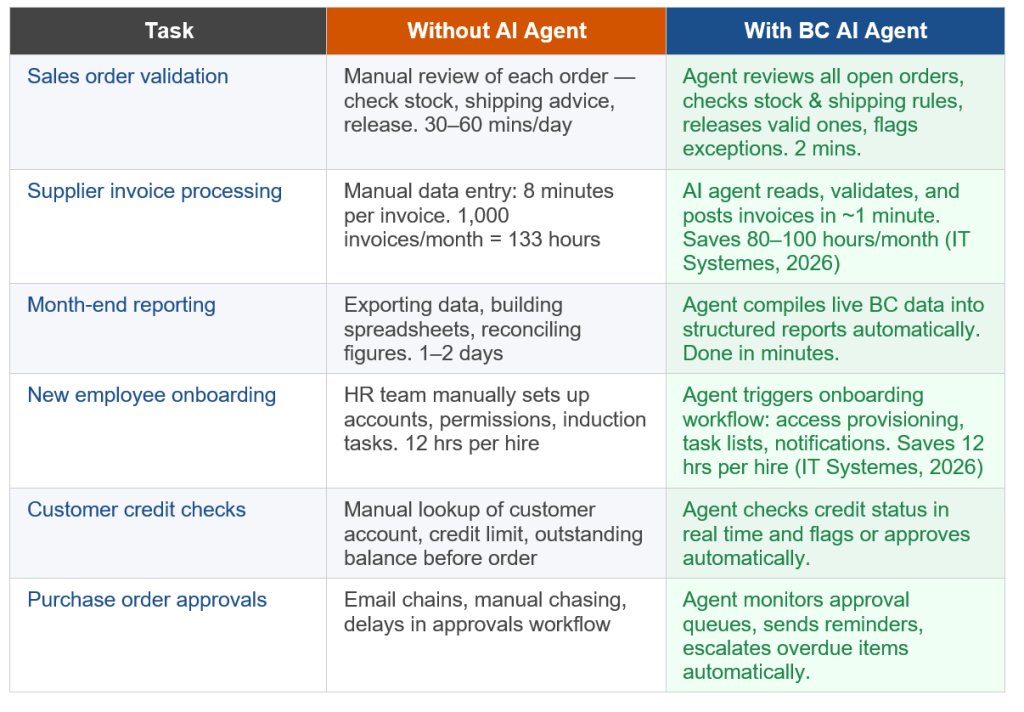
Here’s how AI agents are changing day-to-day work across common business functions:
How Much Time Could Your Team Save?
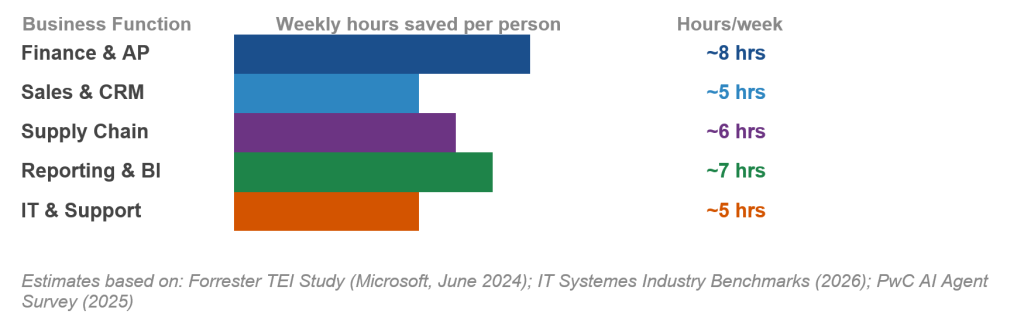
Based on industry benchmarks and Microsoft’s own Forrester study, here’s an estimate of weekly time savings per person by function when AI agents are embedded into Business Central:
Is It Safe? What About Errors?
It’s a fair question. The good news is that Business Central’s AI agents are designed with guardrails built in from the start:
- Every action the agent takes is logged — full audit trail, always
- Permissions are strictly enforced — the agent can only access what you’ve allowed
- Human-in-the-loop approvals are built in for any critical decisions
- You can review, pause, or deactivate any agent at any time
- Agents operate transparently — you always know exactly what they did and why
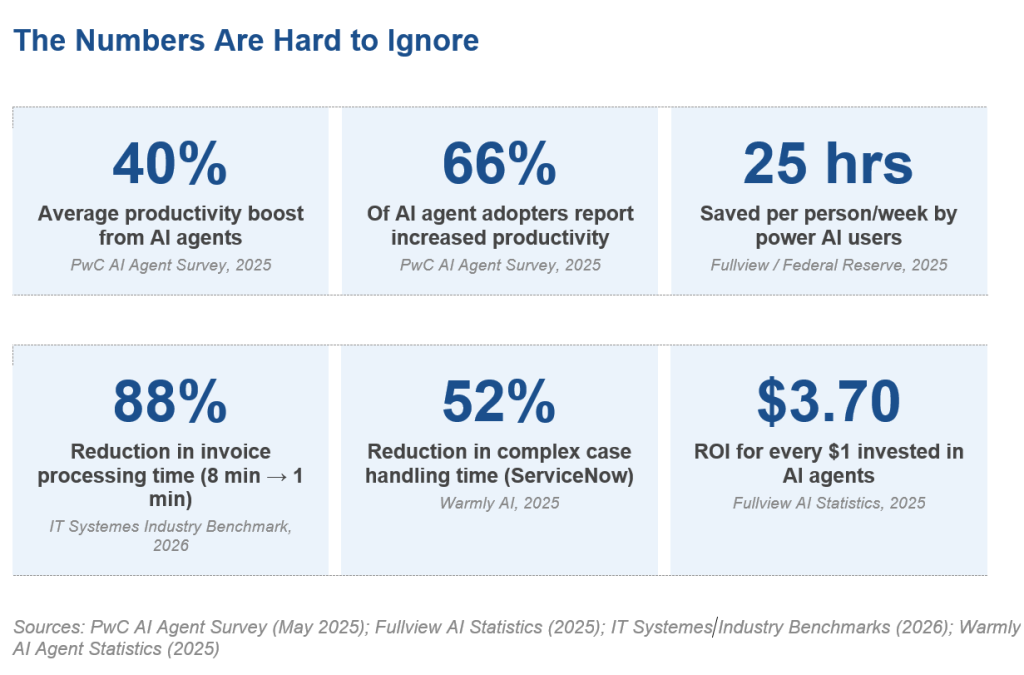
76% of enterprises now include human-in-the-loop processes in their AI deployments to catch errors before they have impact. Business Central’s agent framework is built around this principle from day one. — Fullview AI Statistics, 2025
Is Your Business Ready for AI Agents?
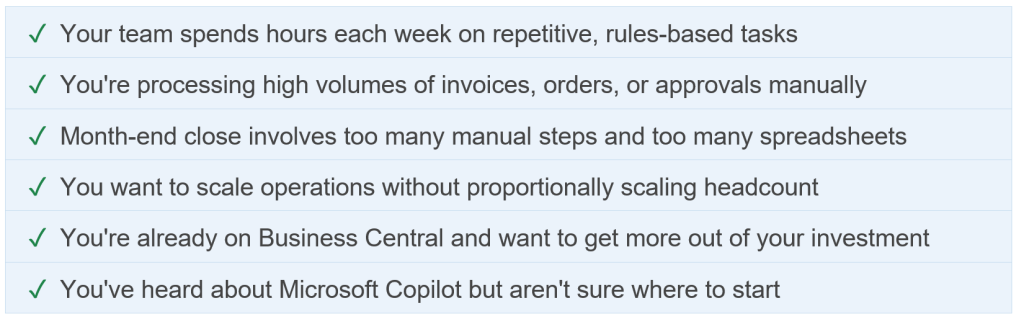
You don’t need to be a large enterprise to benefit. If any of the below apply to your business, AI agents inside Business Central could start saving you time within weeks:
Want AI Agents Working for Your Business?
At Dynamics Circle, we help Australian businesses unlock the full power of Microsoft Business Central — including the latest AI agent capabilities in BC. Whether you’re starting from scratch or looking to extend your current BC setup, we’ll show you exactly what’s possible.
Free consultation. No obligation. Just an honest conversation.
Comments are closed